
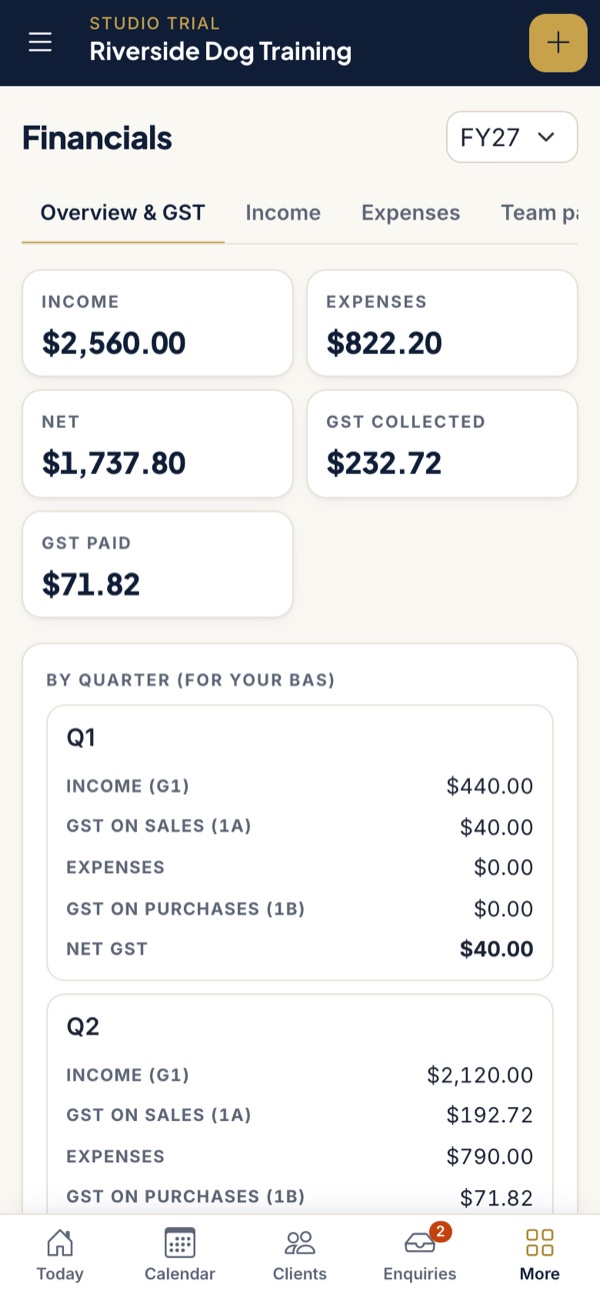
What your client can hand you
| Record | How it is kept |
|---|---|
| Income | Every payment received, by card, bank transfer or cash, dated the day it was received and linked to its tax invoice |
| GST on sales | Worked out on each payment from the invoice. Practices not registered for GST are flagged and charge none |
| Expenses | Date, description, category, supplier, gross and GST, with GST-free items marked and a receipt photo or PDF attached |
| Card fees | Shown separately as a deductible expense, because Stripe takes them before payouts reach the bank |
| Bank matching | Card payouts and bank transfers matched to invoices from uploaded CSV, OFX or QFX statements |
| GST by quarter | Income (G1), GST on sales (1A), expenses, GST on purchases (1B) and net GST for each quarter of the financial year |
| Team pay (Studio) | Pay owed per session to each trainer, split into the bank amount and super, totalled for the year |
| Equipment sales | Leads, harnesses and other gear sold to clients, recorded as income with their own category |
Income is on a cash basis. Quarters follow the Australian financial year, so Q1 is July to September.
Getting the export
Your client opens Financials, picks the financial year and downloads two CSV files, one for income and one for expenses. Each has the same columns:
| Date | Description | Category | Gross | GST | Supplier |
|---|---|---|---|---|---|
| 2026-08-04 | INV-0142 · Sam Lee | training (you) | 180.00 | 16.36 | |
| 2026-08-06 | Hall hire, August | general | 260.00 | 23.64 | Community Hall |
Sample rows from the demo practice.
Clients, dogs, invoices and payments can also be exported in full from Settings at any time.
What PackOffice does not do
- It does not lodge the BAS or the tax return. It gives you the figures.
- It is not double-entry accounting: no balance sheet, loans, assets or depreciation.
- It does not run payroll or Single Touch Payroll. Trainers with employees still need payroll software.
- It does not connect directly to Xero or QuickBooks. The CSV is the bridge.
For most sole trader trainers paying contractors rather than employees, that is enough to work from. If your client has employees, several entities or significant assets, you may still want them in Xero or QuickBooks. When accounting software earns its fee.
Questions accountants ask
Is PackOffice income on a cash or accruals basis?
Cash. Income is counted on the date the payment was received, and expenses on the date entered. Quarters follow the Australian financial year, July to June.
What format is the export?
CSV, one file for income and one for expenses per financial year, with columns for date, description, category, gross amount, GST and supplier.
Does PackOffice connect to Xero or QuickBooks?
Not directly. The CSV export loads into Xero, QuickBooks or a working paper. Many solo trainers use PackOffice instead of accounting software and hand over the export at year end.
Does PackOffice lodge the BAS?
No. It shows the G1, 1A and 1B figures by quarter. The trainer, their BAS agent or their accountant lodges.
Something you need that is not here? Email [email protected]. We would rather build the export you want than have you retype figures.
Have a trainer client drowning in admin?
Send them the tour. PackOffice keeps their bookings and their books together, so what reaches you at year end is already sorted.
Take the tourSee pricing